Developer working with Claude Code skills showing three pathways: reference files, scripts, and AI intelligence converging into an orchestrator pattern
Claude Code: Agent Skills Deep Dive Part 2
Part 2 of 2: Deep Dive and Implementation
Welcome Back
You’ve learned the fundamentals. You understand why Partial Data Automation matters. Now it’s time to build production-ready skills that leverage PDA’s full power. PDA is progressive disclosure architecture and it is helps minimize the overhead of skills on your context window.
In Part 1, we explored the conceptual foundation of Claude Code skills and the PDA philosophy. You discovered when to apply PDA and how Claude Code natively supports it through the Read tool, Bash tool, and AI reasoning. You learned the critical distinction: skills should be orchestrators that load what they need, not encyclopedias that carry everything.
Part 2 delivers the implementation playbook:
Three battle-tested PDA techniques with complete, working code
Real-world integrations combining all three techniques
Best practices learned from production deployments
Performance analysis with concrete token savings
Advanced patterns for scaling your skills
Think of this as your field guide. By the end, you’ll have the knowledge to build skills that are lean, fast, and resilient — skills that adapt to failures and guide users through complex workflows.
Traditional skills load everything upfront. Every invocation carries the full weight of documentation, regardless of what’s actually needed.
Traditional Approach:
# plantuml.md (50KB)
[Complete syntax for sequence diagrams: 15KB]
[Complete syntax for class diagrams: 18KB]
[Complete syntax for ER diagrams: 12KB]
[Complete syntax for flowcharts: 5KB]
Every time you generate a sequence diagram, you load 50KB — but you only use 15KB. The remaining 35KB is wasted context.
Agent Skill PDA Approach with Lazy Loading:
.claude/skills/
├── plantuml.md (3KB - routing logic only)
└── reference/
    ├── sequence_diagrams.md (8KB - loaded when needed)
    ├── class_diagrams.md (10KB - loaded when needed)
    ├── er_diagrams.md (7KB - loaded when needed)
    └── flowcharts.md (5KB - loaded when needed)
The skill prompt is a lightweight router. It loads only the specific reference it needs for the current task. This is lazy loading for documentation — the same principle that makes modern applications fast.
The Lazy Loading Sequence in Action for Agent Skills
Here’s exactly what happens when a skill uses lazy loading:
Press enter or click to view image in full size
Building Your Lazy Loading Skill
Step 1: Create the Skill Router (plantuml.md — 3KB)
# PlantUML Skill Generate PlantUML diagrams from descriptions and render to PNG.
**Supported Diagram Types:** - Sequence diagrams (interactions over time) - Class diagrams (object-oriented structure) - ER diagrams (entity relationships) - Flowcharts (process flows) **Process:**
1.**Analyze Request** - Identify diagram type from user description - If unclear, ask user to specify 2.**Load Reference** - Sequence diagrams → Read reference/sequence_diagrams.md - Class diagrams → Read reference/class_diagrams.md - ER diagrams → Read reference/er_diagrams.md - Flowcharts → Read reference/flowcharts.md 3. **Generate Code** - Use loaded syntax to create PlantUML code - Follow best practices from reference - Validate syntax correctness 4. **Render Diagram** - Execute: `plantuml -tpng diagram.puml` - Check output success - Return image path to user
**Error Handling:** - If diagram type unclear: Ask user to clarify - If reference file missing: Report error, list available types - If PlantUML command fails: Check syntax, report specific error
Notice what’s not in this file: detailed PlantUML syntax. The skill knows what to load, not the syntax itself.
Sequence diagrams illustrate how participants interact over time, showing the flow of messages and temporal ordering of events. They excel at documenting interaction protocols, communication flows, and complex multi-actor processes.
## Basic Syntax
The simplest sequence diagram declares participants and defines messages between them. Participants can be implicit (created on first mention) or explicit (declared with the `participant` keyword for more control):
```puml @startuml participant User participant "Web Server" as WS database "Database" as DB
User -> WS : Send Request WS -> DB : Query Data DB --> WS : Return Results WS --> User : Send Response @enduml ```
## Participant Types
PlantUML supports specialized participant types beyond standard boxes:
-`participant` - Standard rectangular box -`actor` - Stick figure for human actors -`boundary` - System boundary representation -`control` - Control/logic component -`entity` - Data entities -`database` - Database systems -`collections` - Collection of items -`queue` - Message queues
**Example:**
```puml @startuml actor User boundary "Web Interface" as Web control "Auth Controller" as Auth entity "Session" as Session database "User DB" as DB
User -> Web : Login Web -> Auth : Authenticate Auth -> DB : Verify Credentials DB --> Auth : User Data Auth -> Session : Create Session Session --> Web : Session Token Web --> User : Login Success @enduml ```
## Participant Customization
### Renaming with Aliases...
This reference is comprehensive for sequence diagrams but says nothing about class diagrams, ER diagrams, or flowcharts. That’s the point. If you need those, then you load those.
This is a real project that you can download and install. Try out the PlantUML Agent Skill and see for yourself or just check out the references.
The Token Math for Agent Skills
Let’s calculate real savings with concrete numbers:
Traditional (Encyclopedia) Approach:
Every skill invocation for any diagram type: -Total loaded:50KB(alldiagramtypes) -Actually used:8KB(sequencesyntax) -Wasted:42KB(84%waste)
These aren’t theoretical numbers. This is how much context you actually save in production use.
Reference File Organization Strategies
How you organize references depends on your skill’s purpose and the structure of the domain you’re documenting. Each strategy optimizes for different access patterns and use cases.
Strategy 1: By Use Case groups references around distinct user workflows or diagram types. When users think in terms of “I need a sequence diagram” or “I need a class diagram,” this organization matches their mental model. Each reference file corresponds to a complete, focused task. This is the most intuitive organization for most skills because it mirrors how users naturally describe their goals.
Strategy 2: By Complexity Level organizes references along a learning curve — basic concepts, intermediate patterns, advanced features. This works well for educational skills or when supporting users with varying expertise. The skill can start by loading basic syntax for beginners, then progressively load more sophisticated references as the user’s needs evolve. This prevents overwhelming newcomers while still supporting power users.
Strategy 3: By Feature Area breaks down references into orthogonal concepts that can be combined. Instead of complete diagram types, you have references for participants, messages, control flow, and styling. This granular approach works best for complex tools with many independent features. The skill can load multiple small references together when a task requires combining several feature areas, giving you maximum flexibility at the cost of slightly more complex loading logic.
Strategy 1: By Use Case (Recommended for most skills)
❌ Over-granularize: Too many tiny files = complexity
❌ Forget error handling: What if reference doesn’t exist?
❌ Skip best practices: References should teach, not just document
If your guide is quite large or a workflow is spread across multiple guides, in your SKILL.md you can specify grep regular expressions and glob file groupings to allow Claude to perform a natural agentic search. This is a form of agentic RAG.
Technique 2: Scripts for Mechanical Work
The Fundamental Problem
API operations, data transformations, and complex processing are verbose to explain in prompts. Worse, they bloat your skill with mechanical details.
Without Scripts (Everything in the Prompt):
# Notion Uploader Skill (30KB prompt) To upload to Notion: 1. Authenticate with bearer token from NOTION_TOKEN env var 2. Parse markdown: headers become heading blocks, paragraphs become paragraph blocks 3. Handle code blocks: create code block objects withlanguage 4. Upload images: convertto base64 or use external URLs 5.Create page in database with parent relationship 6. Paginate block creation (max 100 blocks per request) 7. Handle rate limiting: exponential backoff with retries 8. Parse Notion API errors: 400/401/404/429 codes 9. Format response URLs foruser [... 20KB more of detailed API documentation] [... Markdown parsing rules] [... Error handling for15+ edge cases] [... Rate limiting algorithms]
This is 30KB of mechanical documentation. Your AI spends tokens understanding API minutiae instead of focusing on user intent and experience.
This example is from a real project that I use a lot.
Press enter or click to view image in full size
Check it out the Notion Uploader/Downloader is converts large markdown files with PlantUML and Mermaid diagrams into a Notion page. It can also download Notion pages, which is nice if you let’s say store tasks or PRDs in Notion.
The Solution: Separation of Concerns
Here’s the architecture that makes skills efficient:
Three-layer architecture diagram: user layer at top, AI orchestrator layer in middle making decisions, script layer executing mechanical work, external APIs at bottom
Press enter or click to view image in full size
Press enter or click to view image in full size
The key insight: Scripts in agent skills handle mechanical operations. AI provides intelligence and user experience. This is separation of concerns applied to prompt engineering.
# NotionUploaderSkill UploadmarkdownfilestoNotiondatabases. **When to use:** - User wants to publish documentation to Notion - User says "upload to Notion", "publish article", etc.
**Process:** 1. **Identify Target File** - If user specifies file path: Use it - If user says "this article": Find relevant .md file - If ambiguous: Search for .md files, ask user to choose 2. **Identify Target Database** - If user provides database ID: Use it - If user provides Notion URL: Extract database ID - Otherwise: Use Notion MCP to search databases, ask user to choose 3. **Upload File** - Execute: `python3 .claude/skills/scripts/upload_notion.py <file_path> <database_id>` - Monitor script output 4. **Interpret Results** - Success: `SUCCESS: <page_url>` → "✓ Article uploaded to Notion: <page_url>" - Error: `ERROR: 404` → Database not found → Use Notion MCP to list available databases → Ask user to choose correct database - Error: `ERROR: 401` → Authentication failed → Guide: "Check your NOTION_TOKEN environment variable" → Show how to get token from Notion settings - Error: `ERROR: Network timeout` → Connection issue → Suggest: "Check internet connection and retry" → Offer to retry automatically - Error: `ERROR: Invalid markdown` → Parsing issue → Show problematic section → Suggest fixes or offer to clean up markdown
Notice what’s in this skill: intent analysis, parameter preparation, and result interpretation. Notice what’s not in this skill: API authentication details, markdown parsing logic, rate limiting algorithms.
Python Script (.claude/skills/scripts/upload_notion.py) — Not in context
#!/usr/bin/env python3 """ Upload markdown file to Notion database. Usage: python3 upload_notion.py <markdown_file> <database_id> Environment: NOTION_TOKEN: Notion API integration token Returns: 0: Success (prints "SUCCESS: <page_url>") 1: Error (prints "ERROR: <message>") """ import sys import os from pathlib import Path from notion_client import Client from markdown_to_blocks import markdown_to_blocks, MarkdownParseError defextract_title(markdown_content): """Extract title from markdown (first # heading).""" for line in markdown_content.split('\\n'): if line.startswith('# '): return line[2:].strip() return"Untitled Document" defupload_to_notion(file_path, database_id): """Upload markdown file to Notion database.""" # Validate inputs ifnot os.path.exists(file_path): print(f"ERROR: File not found: {file_path}") return1 # Get Notion token notion_token = os.environ.get("NOTION_TOKEN") ifnot notion_token: print("ERROR: 401 - NOTION_TOKEN environment variable not set") return1 # Initialize Notion client try: notion = Client(auth=notion_token) except Exception as e: print(f"ERROR: 401 - Authentication failed: {e}") return1 # Read markdown file try: withopen(file_path, 'r', encoding='utf-8') as f: markdown_content = f.read() except Exception as e: print(f"ERROR: Failed to read file: {e}") return1 # Extract title title = extract_title(markdown_content) # Parse markdown to Notion blocks try: blocks = markdown_to_blocks(markdown_content) except MarkdownParseError as e: print(f"ERROR: Invalid markdown at line {e.line}: {e.message}") return1 except Exception as e: print(f"ERROR: Failed to parse markdown: {e}") return1 # Create page in database try: page = notion.pages.create( .. and so on...
Claude: [Interprets error] "The database ID seems to be invalid. Let me search your Notion workspace for available databases..." [Uses Notion MCP tosearch] "I found these databases: 1. 📝 Articles (ID: def456...) 2. 📚 Blog Posts (ID: ghi789...) 3. 📋 Drafts (ID: jkl012...) Which database should I upload to?"
User: "Articles"
Claude: [Retries with correct ID] "✓ Successfully uploaded to Notion: [URL]"
The AI layer transformed a rigid error into helpful, adaptive guidance. This is the secret sauce of PDA.
The Error Recovery Flow for Agent Skill
Here’s how error recovery works in production:
Press enter or click to view image in full size
Critical observation: Every error path leads to either user guidance or automated recovery. There are no dead ends. Users are never left wondering “what now?”
AI: - Searches working directory for .md files - Finds: article1.md, article2.md, draft.md - Asks: "I found three markdown files. Which one should I upload?" - User selects - Proceeds with upload
2. Invalid Parameters
Traditional script:
$ upload_notion.py article.md invalid123
ERROR: 404 - Database not found
# User stuck, no guidance
With AI resilience:
Script: "ERROR: 404 - Database not found"

AI:
- Recognizes invalid database ID
- Uses Notion MCP to search for databases
- Presents: "Here are your available databases..."
- User selects correct one
- Retries upload
- Success
AI: "Your Notion API token isn't configured. Here's how to fix it: 1. Go to <https://www.notion.so/my-integrations> 2. Create a new integration (or use existing) 3. Copy the 'Internal Integration Token' 4. Run: export NOTION_TOKEN='secret_...' 5. Share the integration with your target database Would you like detailed instructions for any of these steps?"
4. Network Failures
Traditional script:
$ upload_notion.py article.md abc123
ERROR: Network timeout
# User stuck, doesn't know if transient or persistent
With AI resilience:
Script: "ERROR: Network timeout"

AI:
"Connection timed out. This is usually temporary.
Should I:
1. Retry now
2. Wait 10 seconds and retry
3. Cancel the upload
What would you like to do?"
User: "Retry now"
AI: [Retries] "Success! Article uploaded."
AI: "A page titled 'Getting Started with PDA' already exists in this database. Would you like to: 1. Update the existing page (replace content) 2. Create a new page with a different title 3. Append to the existing page 4. Cancel this operation What would you like to do?"
Error Handling in Agent Skill Prompts
Structure error interpretation in your skill prompts:
**Error Interpretation:**
If script returns exit code 1: - Parse error message for specific codes Iferror contains "404"or"not found": - Resource doesn't exist - Use [search tool] to find valid resources - Present options to user with clear descriptions - Get user selection - Retry with correct resource Iferror contains "401"or"unauthorized": - Authentication failed - Explain what went wrong - Provide step-by-step credential setup guide - Offer to wait while user configures - Suggest verification steps Iferror contains "Network"or"timeout": - Connection issue (likely transient) - Suggest checking internet connection - Offer immediate retry or delayed retry - Track retry attempts (max 3) - If persistent, suggest troubleshooting Iferror contains "409"or"conflict": - Resource conflict (duplicate, collision) - Explain the specific conflict - Present resolution options - Get user decision - Execute chosen resolution Iferroris unrecognized: - Show full error message to user - Suggest checking script logs for details - Offer to help debug based onerror patterns - Guide user to script documentation
Complete Conversation Example with Agent Skill
Here’s a full interaction showing error recovery in action:
User: "Upload work/article.md to Notion"
Claude: [Activates notion-uploader skill] "I'll upload work/article.md to Notion. Which database should I use?"
User: "My articles database"
Claude: [Searches Notion] "I found two databases matching 'articles': 1. 📝 Articles (Personal) - 47 pages 2. 📰 Team Articles (Shared) - 12 pages Which one?"
Claude: [Interprets error, adapts approach] "Authentication failed. Your NOTION_TOKEN environment variable isn't configured correctly. Here's how to fix it: 1. Go to <https://www.notion.so/my-integrations> 2. Create a new integration (or select an existing one) 3. Copy the 'Internal Integration Token' 4. In your terminal, run: export NOTION_TOKEN='secret_...' 5. Make sure the integration has access to your Personal Articles database After setting the token, I'll automatically retry the upload. Let me know when you're ready."
User: "I set the token. Try again." Claude: [Retries script]
Claude: "✓ Successfully uploaded to Notion! 📄 Mastering Partial Data Architecture 🔗 <https://notion.so/Article-Title-abc123> 📊 Personal Articles database Your article is now live. The page includes all formatting, code blocks, and section structure from the markdown."
AI Resilience Patterns with Agent Skill
Pattern 1: Retry with Correction
On script failure:
1. Interpret the specific error
2. Identify if error is correctable
3. Determine correction strategy
4. Apply correction or guide user to apply it
5. Retry operation automatically
6. Report result (success or escalate)
Pattern 2: Graceful Degradation
If script unavailable or fails repeatedly:
1. Recognize script isn't working
2. Explain what the script would have done
3. Offer manual alternative workflow
4. Provide step-by-step manual instructions
5. Guide user through manual process
6. Verify manual completion
Pattern 3: Progressive Disclosure
Error handling progression: 1. Initial attempt:Simple,optimisticpath 2. First failure:Tryautomaticrecovery 3. Second failure:Tryalternativeapproach 4. Third failure:Detaileddebuggingwithuser 5. Persistent failure:Experttroubleshootingguide
Generate PlantUML diagrams from descriptions and publish to Notion. **Workflow:** 1. Generate diagram from user description 2. Optionally publish to Notion documentation
**Process:**
**Step 1: Analyze Request** - Identify diagram type (sequence, class, flowchart) - Extract description of what to visualize - Determine if Notion publishing is requested
Claude: "✓ Created OAuth authentication sequence diagram and added it to your System Architecture page. 📊 Diagram shows: - User authentication flow - Authorization code exchange - Token-based access to protected resources 🔗 View in Notion: <https://notion.so/System-Architecture-abc123> The diagram has been appended to the end of your Architecture page."
Performance Metrics for Agent Skill
Context Usage per Invocation:
Skill core: 4KB
Loaded reference (sequence): 8KB
Scripts: 0KB (not loaded)
Total: 12KB
Traditional Approach:
PlantUML syntax (all types): 50KB
Notion API docs: 30KB
Total: 80KB
Savings: 68KB (85% reduction)
Benefits Demonstrated:
✅ Technique 1 (Lazy Loading): Only sequence diagram syntax loaded, not class diagrams, ER diagrams, or flowcharts
✅ Technique 2 (Scripts): Diagram generation and Notion upload handled by scripts, not documented in prompts
✅ Technique 3 (AI Resilience): Error handling for missing pages, auth failures, syntax errors with helpful recovery guidance
✅ Modularity: Easy to add new diagram types (just add new reference file)
✅ Testability: Scripts can be independently tested with pytest or bash test frameworks
✅ Maintainability: Clear separation means updates are isolated to relevant components
Best Practices and Common Pitfalls
Agent Skill Reference File Best Practices
Avoid context rot. Loading everything makes the AI work less. You flood the context with information the LLM does not need to do what you want, which means it more likely to get confused. Also tokens input has a price. Longer processing time and more used up tokens. It is better to use a scalpel to do surgery rather than an axe.
Organization:
✅ Do:
reference/
├── sequence_diagrams.md    # Clear, focused on one diagram type
├── class_diagrams.md       # One topic per file
└── flowcharts.md          # Descriptive, predictable names
This is too minimal. The AI can’t generate quality diagrams from just syntax.
✅ Do provide complete guidance:
# sequence_diagrams.md (8KB)
## Participants (syntax + examples)
## Messages (arrows + patterns)
## Activations (lifecycle)
## Common Patterns (3-4 real examples)
## Best Practices (5-7 guidelines)
## Common Errors (what to avoid)
Pitfall 3: Vague Error Messages
❌ Don’t be vague:
ERROR: Something went wrong ERROR: Failed ERROR:Error occurred
Decide: Basic or PDA? (Use the decision checklist from Part 1)
Implement using patterns from this guide
Measure token usage and performance improvements
Iterate based on real-world use and feedback
Share your skills:
Document your PDA patterns and discoveries
Share with the Claude Code community
Contribute to skill libraries and repositories
Help others learn and improve their skills
Build the collective knowledge base
Based on the project files and official spec, here’s a concise overview:
Claude Agent Skill Best Practice: Make sure you Claude Skill is compliant: Skill Requirements (Official Spec)
Minimum Structure
skill-name/
└── SKILL.md    # Required - must match folder name
Required YAML Frontmatter
--- name:skill-name# hyphen-case, lowercase alphanumeric + hyphens only description:|# What it does and WHEN Claude should use it Thisskillshouldbeusedwhen... ---
That’s it. The official spec is minimal: name + description in frontmatter, followed by markdown content. Also the name of the skill should match the skill directory.
Claude: Agent Skill Best Practice: Description Quality
Use third-person: “This skill should be used when…” (not “Use this skill when…”)
Include specific trigger phrases users would say
Be concrete about scenarios
# Good description: This skill should be used when the user asks to"create a hook", "add a PreToolUse hook", or mentions hook events.
# Bad
description: Helps with hooks.  # Too vague, wrong person
Claude: Agent Skill Best Practice: Writing Style
Use imperative/infinitive form throughout the markdown body
Verb-first instructions, not second person
# Good
To create a diagram, load the reference file first.
Validate inputs before processing.

# Bad
You should create a diagram by loading the reference file.
You need to validate inputs.
Claude Skill Best Practice: Progressive Disclosure Structure
SKILL.md = routing logic, essential procedures, pointers to resources
references/ = detailed documentation Claude loads when needed
scripts/ = deterministic code for repetitive/mechanical tasks
assets/ = files used in output (templates, images, fonts)
Claude Skill Best Practice: When to Use Each Resource Type
Resource — — — — — — — — — -Use When
references/ — — — — — — — — Documentation Claude should consult while working (schemas, API docs, detailed guides)
scripts/ — — — — — — — — — — Same code gets rewritten repeatedly, or deterministic reliability needed
assets/ — — — — — — — — — — — Files for final output (templates, boilerplate, images)
Claude Skill Best Practice: Keep SKILL.md Lean
Target: 1,500–2,000 words
Maximum: ~5,000 words
Move detailed content to references/
Only include essential procedural instructions
Reference Supporting Files
## Additional Resources
For detailed patterns, consult:
- **`references/patterns.md`** - Common patterns
- **`references/advanced.md`** - Advanced techniquesWorking examples in `examples/`:
- **`examples/basic.sh`** - Basic usage
Validation Rules (From quick_validate.py)
SKILL.md must exist
Must start with --- (YAML frontmatter)
Must have valid frontmatter format (closed with ---)
Must contain name: field
Must contain description: field
Name must be hyphen-case: ^[a-z0-9-]+$
Name cannot start/end with hyphen or have consecutive hyphens
Description cannot contain angle brackets (< or >)
Quick Checklist
□ SKILL.md existswith valid YAML frontmatter □ name: hyphen-case, matches folder name □ description: third-person, specific triggers □ Body uses imperative form (not "you should") □ Core content under 3,000 words □ Detailed docs moved toreferences/ □ All referenced files exist □ Scripts are executable and documented
Final Thoughts
The journey from basic skills to PDA mastery is about recognizing when complexity calls for better organization. Skills extend Claude’s capabilities in your domain. PDA makes those extensions efficient, maintainable, and powerful.
You now have the knowledge to build skills that are:
Lean: Loading only what’s needed (orchestrator pattern)
Skills Debugger: A Developer Tool for Claude Skills
To help streamline the development and debugging of Claude Code skills, I created the Skills Debugger — a desktop tool that provides comprehensive visualization and analysis of your skills.
Key Features
Visual Structure Analysis:
The tool provides an interactive view of your skill’s architecture, showing the relationships between the main skill file, reference documents, and scripts. This makes it easy to understand the scope and complexity of your PDA implementation at a glance.
Reference and Script Inspection:
View the complete contents of reference files and scripts directly within the tool. This eliminates the need to switch between files while debugging or refining your skills constantly.
Trigger Analysis:
The debugger analyzes your skill’s trigger conditions and provides optimization suggestions. This helps ensure your skills activate at the correct times and respond to the appropriate user intents.
Quality Reports:
Broken Link Detection: Identifies references to files that don’t exist
PDA Score Analysis: Evaluates how well your skill follows PDA principles
Spec Compliance: Checks adherence to Claude Code skill specifications
Trigger Suggestions: Recommends improvements to trigger conditions
Architectural Diagrams:
Automatically generates visual diagrams showing the relationships between your skill components. These diagrams help you quickly understand the flow of data and the dependencies within your skill structure.
Development Status
The Skills Debugger is an evolving side project that continues to add new features based on real-world skill development needs. It’s designed to grow alongside the Claude Code skills ecosystem.
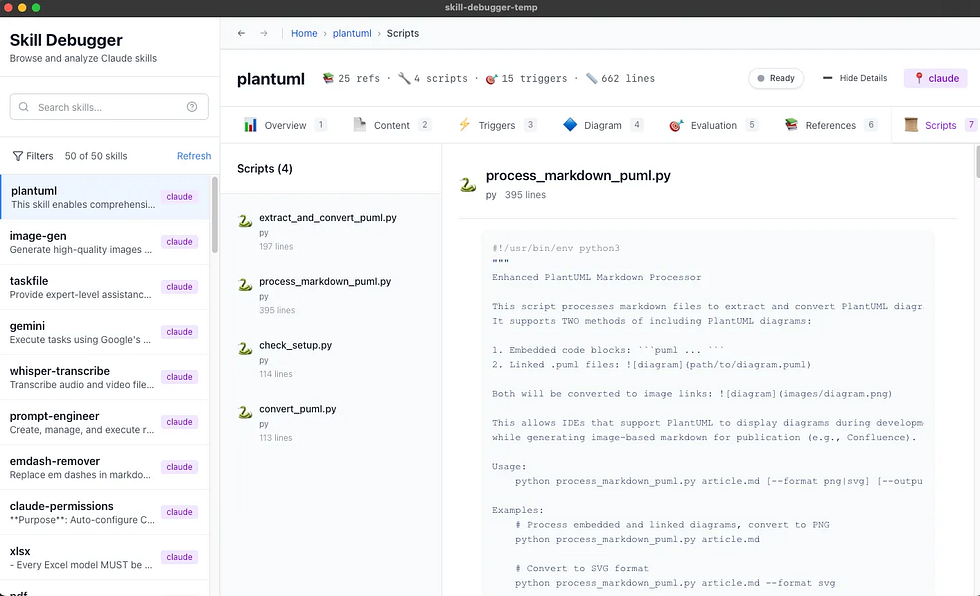
It displays scripts, triggers, content, and diagrams of the tool. It also shows what’s in references and scripts.
Press enter or click to view image in full size
It helps you analyze what triggers your skill.
Press enter or click to view image in full size
It shows scripts as well.
Press enter or click to view image in full size
It draws a nice diagram of the Skills resources so you can get a feel for the scope.
Press enter or click to view image in full size
I included reports for broken link references, poor PDA scores, spec compliance, and some trigger suggestion analysis.
Press enter or click to view image in full size
It is an evolving side project.
I also started downloading top skills (about 4K so far) and then ran some NLP analysis on them.
Press enter or click to view image in full size
I implemented agentic grading, similar to what I built for the Skills Debugger, and used it to evaluate skills. I’m trying to understand how people use Skills and how to write efficient, agentic Skills.
Press enter or click to view image in full size
I did a lot of NLP work to find the various categories of skills as well.
Questions or feedback? Share your PDA skills and patterns with the community. Let’s build the future of Claude Code together.
Appendix: Quick Reference
PDA Decision Checklist
□ Skill has >10KB documentation □ Multiple use cases need different documentation □ External API integration required □ Complex processing needed (data transform, rendering, etc.) □ Skill will grow and evolve overtime If 2+ checked → Use PDA If 0-1 checked → Basic skill is fine
[One-line description of what this skill does] **When to use:** - [Trigger condition or user intent 1] - [Trigger condition or user intent 2] **Process:** 1.**[Step 1 Name]** - [Action to take] - If [condition]: [specific handling] 2.**[Step 2 Name]** (Load Reference if needed) - If [condition 1]: Read reference/[file1].md - If [condition 2]: Read reference/[file2].md - Use loaded knowledge for [action] 3.**[Step 3 Name]** (Execute Script if needed) - Execute: `[script command with args]` - Monitor output for success/error patterns 4.**[Step 4 Name]** (Interpret Results) - If SUCCESS: [action] - If ERROR [pattern]: [interpretation and recovery]
Rick Hightower is a technology executive and data engineer with extensive experience at a Fortune 100 financial services organization, where he led the development of advanced Machine Learning and AI solutions to optimize customer experience metrics. His expertise spans both theoretical AI frameworks and practical enterprise implementation.
Notion Uploader/Downloader: Seamlessly upload and download Markdown content and images to Notion for documentation workflows
Confluence Skill: Upload and download Markdown content and images to Confluence for enterprise documentation
JIRA Integration: Create and read JIRA tickets, including handling special required fields
Recently, I wrote a desktop app called Skill Viewer to evaluate Agents skills for safety, usefulness, links and PDA.
Press enter or click to view image in full size
Press enter or click to view image in full size
Press enter or click to view image in full size
Advanced Development Agents
Architect Agent: Puts Claude Code into Architect Mode to manage multiple projects and delegate to other Claude Code instances running as specialized code agents
Project Memory: Store key decisions, recurring bugs, tickets, and critical facts to maintain vital context throughout software development
Visualization & Design Tools
Design Doc Mermaid: Specialized skill for creating professional Mermaid diagrams for architecture documentation
PlantUML Skill: Generate PlantUML diagrams from source code, extract diagrams from Markdown, and create image-linked documentation
Image Generation: Uses Gemini Banana to generate images for documentation and design work
SDD Skill: A comprehensive Claude Code skill for guiding users through GitHub’s Spec-Kit and the Spec-Driven Development methodology.
PR Reviewer Skill: Comprehensive GitHub PR code review skill for Claude Code. Automates data collection via gh CLI, analyzes against industry-standard criteria (security, testing, maintainability), generates structured review files, and posts feedback with approval workflow. Includes inline comments, ticket tracking, and professional review templates.
AI Model Integration
Gemini Skill: Delegate specific tasks to Google’s Gemini AI for multi-model collaboration
Image_gen: Image generation skill that uses Gemini Banana to generate images.
Explore more at Spillwave Solutions — specialists in bespoke software development and AI-powered automation.

 Posts
Posts




No comments:
Post a Comment